By Fotify
Speed Networking 2026: O Guia Completo para Organizadores de Eventos
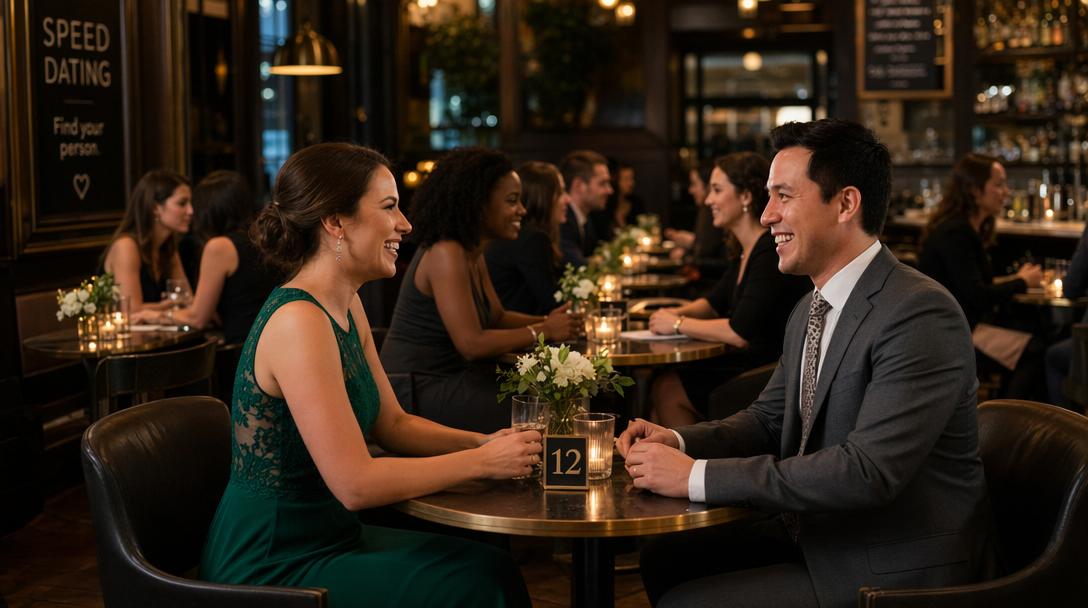
O speed networking silenciosamente se tornou um dos segmentos mais valiosos de qualquer evento profissional. Quando funciona, ele gera mais conexões de alta qualidade em 45 minutos do que um dia inteiro de "networking aberto" jamais conseguiria. Quando falha — e o formato tradicional falha com frequência — parece uma feira de empregos para pessoas que não queriam estar ali.
Este é o guia de 2026 para organizar uma sessão de speed networking que funciona. Ele cobre formato, tempos, montagem do local, a pilha de tecnologia, divulgação e o modelo exato de evento que usamos em eventos que vão de 40 a 800 participantes. Se você está planejando um bloco de speed networking dentro de uma conferência, um mixer trimestral independente ou um evento virtual, o guia se aplica.
O Que É Speed Networking?
Speed networking é um formato estruturado em que os participantes se encontram em conversas curtas e cronometradas — normalmente de 3 a 7 minutos — e depois trocam de par. Diferente do networking aberto (em que os extrovertidos dominam e os introvertidos se escondem), o speed networking garante que cada participante conheça todos os outros (ou pelo menos um subconjunto selecionado) dentro de uma janela de tempo definida.
Foi inventado no início dos anos 2000 como uma evolução do speed dating, originalmente para matchmaking de negócios. O formato atingiu o auge em meados dos anos 2010, perdeu força quando os eventos híbridos dominaram durante a pandemia e, desde então, foi reconstruído em torno de uma camada de aplicativo de matching que o torna muito mais utilizável do que a versão em formulário de papel.
A versão de 2026 funciona assim:
- Os participantes criam um perfil em um aplicativo de matchmaking do evento antes da sessão começar
- Eles se encontram em rodízios estruturados (normalmente de 4 a 5 minutos cada)
- Durante ou depois de cada conversa, eles deslizam para sim ou não sobre a pessoa que acabaram de conhecer
- Deslizes mútuos de "sim" viram matches — com as informações de contato (LinkedIn, e-mail) reveladas automaticamente
O aplicativo de matching substitui as fichas de pontuação em papel, a digitação de dados pós-evento e o e-mail atrasado do tipo "aqui estão seus matches". Tudo acontece em tempo real.
Por Que Vale a Pena Fazer uma Sessão de Speed Networking
Três motivos:
- Conexões garantidas para introvertidos. Em qualquer conferência, de 30% a 40% dos participantes nunca vão abordar um desconhecido durante o networking aberto. O speed networking elimina essa barreira por completo — o formato faz a abordagem por eles.
- Tempo de conexão de alta densidade. Uma sessão de speed networking de 45 minutos gera de 8 a 12 conversas curtas por participante. O networking aberto de mesma duração normalmente gera de 2 a 4.
- Resultados mensuráveis. Com um aplicativo de matching, os organizadores conseguem medir engajamento, matches e conversão de acompanhamento pós-evento. O networking aberto só dá uma sensação geral, sem números.
O speed networking é especialmente valioso para:
- Conferências de médio porte (100 a 1.500 participantes) em que um software de matchmaking empresarial é um exagero
- Mixers setoriais e grupos de usuários que realizam eventos recorrentes
- Retiros [offsites] corporativos com metas de networking entre departamentos
- Eventos de ex-alunos em que o objetivo é justamente reconectar e criar novos laços
- Eventos de investidores e fundadores em que um matching direcionado gera fluxo de negócios
- Programas de mentoria em organizações e bootcamps
Opções de Formato
Formato 1: Rodízio Round-Robin (Clássico)
Todo mundo conhece todo mundo em rodadas cronometradas. Para grupos de 20 a 40 pessoas, isso funciona. Acima de 50, fica inviável — uma rodada de 4 minutos × 50 rotações = 200 minutos, o que ninguém aguenta sentado.
Melhor para: grupos pequenos e focados (fundadores e investidores, mentores e mentorados, grupos de usuários) Duração de cada rodada: 4 a 5 minutos Duração total: 40 a 90 minutos Capacidade: 20 a 40 participantes
Formato 2: Rodízio Segmentado
Divida os participantes em grupos de 8 a 12 pessoas. Cada grupo faz seu próprio round-robin. Depois do primeiro conjunto de rotações, os grupos se misturam ou são reorganizados. Funciona para até 200 participantes.
Melhor para: conferências de médio porte, networking segmentado por setor Duração de cada rodada: 4 minutos Duração total: 45 a 60 minutos Capacidade: 80 a 200 participantes
Formato 3: Matchmaking Aberto com Aplicativo de Networking do Evento
Sem rodízios estruturados. Os participantes circulam livremente, mas o aplicativo de matchmaking fica ativo o tempo todo — eles deslizam por perfis no celular e usam os matches como ponto de partida para conversas. O formato mais flexível e o que mais cresce em 2026.
Melhor para: grandes conferências, mixers casuais, eventos com agenda densa Duração de cada rodada: não se aplica — contínuo Duração total: 60 a 180 minutos Capacidade: qualquer (testado com até 2.000 participantes)
Formato 4: Híbrido (Recomendado para a Maioria dos Eventos)
Circulação livre com o aplicativo de matchmaking ativo o tempo todo, mais uma ou duas rodadas estruturadas de rotação de 20 minutos no meio da sessão. Combina a cobertura garantida do speed networking clássico com a flexibilidade do matchmaking aberto.
Melhor para: a maioria dos eventos do mundo real Duração de cada rodada: 4 minutos (durante os rodízios) Duração total: 90 minutos (30 aberto + 20 rodízio + 30 aberto + 10 encerramento) Capacidade: 40 a 500 participantes
O restante deste guia parte do formato híbrido.
A Camada de Aplicativo no Speed Networking
Essa é a peça central. O speed networking tradicional usava formulários de papel, uma operação central de digitação de dados e um e-mail atrasado com os matches. O speed networking moderno roda em um aplicativo de matchmaking do evento que lida com matching, revelação de contato e privacidade em tempo real.
Comparamos as principais opções no nosso guia dos melhores aplicativos de networking para eventos em 2026. Resumindo:
- Brella, Swapcard, Grip: software de matchmaking empresarial, com preços voltados para conferências com mais de 3.000 participantes e inventário de patrocinadores. Matching por IA poderoso, mas de US$ 5.000 a US$ 25.000+ por evento.
- SpeedMatchApp: plataforma dedicada de speed dating e speed networking, com integração ao Eventbrite. Assinatura de US$ 100 a US$ 200 por mês.
- Fotify Match & Connect: aplicativo de matchmaking de uso geral para eventos. US$ 19,99 fixo por evento, sem assinatura, sem download de aplicativo para os convidados.
Para a grande maioria dos organizadores de speed networking — grupos de usuários, mixers setoriais, conferências de médio porte, eventos regionais — o Fotify Match & Connect é a escolha certa. O preço por evento significa que você pode se dar ao luxo de fazer speed networking em todo mixer recorrente. E, como os convidados não baixam nenhum aplicativo, o engajamento é muito maior do que em plataformas baseadas em app (60% a 75% de criação de perfil pelos participantes, contra 20% a 40% no Brella/Swapcard em eventos de tamanho semelhante).
O que procurar em um aplicativo de speed networking
- Sem download de aplicativo — apenas baseado no navegador
- Matching com privacidade em primeiro lugar (revelação de contato por consentimento mútuo)
- Revelação de LinkedIn/e-mail (não só Instagram)
- Filtros por setor, cargo e interesse
- Modo somente por convite, com importação via CSV de participantes registrados
- Métricas para o organizador em tempo real
- Marca personalizada e URLs curtas
Modelo de Evento Passo a Passo (Sessão de 90 Minutos, 100 Participantes)
Use isso como um modelo pronto para conferências, eventos corporativos ou mixers independentes.
Pré-Evento (2 a 4 semanas antes)
| Quando | Tarefa |
|---|---|
| 4 semanas antes | Configure um evento na Fotify, adicione o Match & Connect, finalize o local |
| 3 semanas antes | Envie um "salve a data" aos participantes registrados com o horário da sessão de networking |
| 2 semanas antes | Envie um e-mail aos participantes registrados com o link de criação de perfil e um vídeo de 60 segundos explicando como funciona |
| 1 semana antes | Envie um lembrete. Confira o painel — mais de 40% de criação de perfil até esse ponto é um bom sinal |
| 3 dias antes | Lembrete final com linguagem focada em LinkedIn: "complete seu perfil para maximizar seus matches" |
Preparação no Dia do Evento (2 horas antes da sessão)
- Montagem do local: mesas altas de coquetel (não fileiras de cadeiras) para os trechos de circulação livre
- Assentos para round-robin: duplas de frente uma para a outra na rodada de rotação de 20 minutos no meio da sessão
- Sino, gongo ou aviso na tela para as trocas de rodada
- Crachás impressos com cargo + interesses (ajuda a filtrar visualmente)
- QR Codes do Match & Connect impressos em 3 pontos: entrada, bar, mesas
- Aplicativo de matching ativado e testado
- Drink de boas-vindas pronto
Fluxo da Sessão (90 minutos)
| Horário | Segmento | O Que Acontece |
|---|---|---|
| 0:00 | Boas-vindas do anfitrião (5 min) | Apresenta o formato, mostra o aplicativo, anuncia a URL curta personalizada |
| 0:05 | Circulação livre (25 min) | Aplicativo ativo, convidados dão match e circulam livremente |
| 0:30 | Rodada estruturada (20 min) | Rotações de 4 minutos, ~5 encontros por participante |
| 0:50 | Intervalo + bar (5 min) | O aplicativo continua ativo; os convidados renovam as bebidas |
| 0:55 | Circulação livre (30 min) | Aplicativo ainda ativo; pico de notificações de match |
| 1:25 | Encerramento do anfitrião (5 min) | Anuncia métricas de engajamento, cria expectativa para o próximo evento |
| 1:30 | O evento termina, começa a after-party ou a próxima sessão |
Pós-Evento (em até 48 horas)
- Exporte as métricas de engajamento do painel do Match & Connect
- Envie um e-mail de acompanhamento: "veja como voltar aos seus matches de ontem à noite"
- Inclua uma chamada para ação para se inscrever no próximo evento
- Compartilhe os números de engajamento publicamente no LinkedIn ("XX% dos participantes deram match")
Esse fluxo de 90 minutos é a estrutura mais replicada que vemos em conferências, grupos de usuários e mixers recorrentes. Ele gera consistentemente de 4 a 7 matches por participante, com uma taxa de criação de perfil de 60% a 75%.
Speed Networking Virtual e Híbrido
O speed networking virtual usa salas de breakout no Zoom, no Microsoft Teams ou em uma plataforma dedicada de eventos virtuais (Hopin, Airmeet). O formato é idêntico ao presencial — rotações de 4 minutos, matching por aplicativo em segundo plano —, mas exige uma disciplina mais rígida do anfitrião, porque a cronometragem do breakout não tem um sinal físico.
Para eventos híbridos em que alguns participantes estão remotos, rode duas trilhas paralelas: speed networking presencial com QR Codes no local, e speed networking virtual com salas de breakout, ambas alimentando o mesmo aplicativo de matchmaking. Os matches podem cruzar as trilhas — um participante remoto pode dar match com alguém presencial e trocar o LinkedIn para uma conversa de acompanhamento.
Para saber mais sobre organizar eventos híbridos, veja nosso guia de speed dating virtual.
Erros Comuns Que Arruínam Sessões de Speed Networking
1. Iniciar os rodízios antes de o aplicativo ter cobertura de perfis
Se apenas 15% dos participantes criaram um perfil, o aplicativo é inútil. Insista bastante na criação de perfis antes do evento e confirme mais de 40% antes de a sessão começar.
2. Fazer rodízios longos demais
4 minutos é a duração certa para a maioria dos eventos. Mais de 5 faz as conversas se arrastarem; menos de 3 as deixa apressadas demais. Na dúvida, 4.
3. Fazer o match por acaso em vez de usar filtros inteligentes
Os melhores aplicativos de matchmaking deixam os participantes filtrarem por setor, cargo ou interesse. Se o seu aplicativo pareia os participantes aleatoriamente, você tem conversas aleatórias. Exija o uso de filtros.
4. Não ter mecanismo de acompanhamento pós-evento
O valor do speed networking não está na conversa durante o evento — está no acompanhamento depois. Se os participantes saem sem informações de contato e sem link de acompanhamento, a sessão foi desperdiçada. Aplicativos de match mútuo com revelação automática do LinkedIn resolvem isso.
5. Usar uma plataforma que exige download de aplicativo
Cobrimos isso em detalhes na nossa página de networking corporativo, mas resumindo: downloads de aplicativo matam o engajamento. Use uma ferramenta baseada no navegador.
6. Proporções ruins
Uma sessão de speed networking com 80% de um perfil e 20% de outro é um formato ruim — o grupo majoritário vai ficar sem pessoas novas para conhecer. Busque proporções equilibradas (fundadores:investidores, mentores:mentorados, sênior:júnior) e limite as inscrições ao tamanho do grupo menor.
Speed Networking vs. Speed Dating de Evento
Os formatos são quase idênticos — as diferenças estão no público e no clima. Temos um guia completo sobre speed dating em eventos que cobre a variante voltada para solteiros. O mesmo guia, o mesmo modelo, o mesmo aplicativo se aplicam — só troque a revelação de LinkedIn pela revelação de Instagram/WhatsApp, e troque as bios do tipo "aqui para expandir minha rede" por uma linguagem mais descontraída.
Como Anunciar o Speed Networking em uma Conferência
O anúncio importa. Um bom anúncio soa como um diferencial de valor; um ruim soa como uma atividade obrigatória. Use algo como:
"Às 15h vamos ter uma sessão de speed networking de 90 minutos no Salão de Festas. O formato é simples: circulação livre com um aplicativo de matching privado que sugere quem mais você deveria conhecer, mais uma rodada curta de rotações de 4 minutos no meio. Se você já criou seu perfil em fotify.app/mc/CONFERENCIA-2026, vai ver os matches aparecerem em tempo real. Se ainda não criou, dá para fazer em 60 segundos na entrada. Esses são os 90 minutos de maior retorno em toda a conferência se você veio para fazer networking. Não perca."
Elementos-chave: horário específico, formato claro, a URL, uma referência ao link de pré-evento e uma âncora de valor ("os 90 minutos de maior retorno"). Evite qualquer coisa que soe obrigatória ou institucional.
Ferramentas e Recursos
- Match & Connect da Fotify — o aplicativo de matchmaking de US$ 19,99 por evento usado neste guia
- Match & Connect para Eventos Corporativos — a página voltada para conferências e eventos corporativos
- Melhores Aplicativos de Networking para Eventos em 2026 — comparação completa das 10 plataformas
- Speed Dating em Eventos: Guia Completo — a variante voltada para solteiros
- Como Fazer Networking em Conferências: O Guia de 2026 — do lado do participante
- Documentação de ajuda do Match & Connect — guia de configuração para códigos de acesso, uploads de CSV e URLs personalizadas
Como Começar
Se você quer adicionar speed networking ao seu evento, mas estava esperando as ferramentas ficarem prontas — elas já estão. A barreira não é mais a tecnologia; é se você vai se comprometer com uma sessão de 90 minutos e divulgá-la bem.
O jeito mais rápido de começar: crie um evento na Fotify, adicione o Match & Connect como complemento por US$ 19,99, siga o modelo de 90 minutos deste post e rode sua primeira sessão. A maioria dos organizadores que faz isso uma vez acaba fazendo em todo evento.
Os preços podem variar de acordo com o seu país e moeda. Veja os preços mais recentes na página de preços.
Explore Nossas Soluções
Descubra como o Fotify pode transformar seus eventos