Features

One platform for everything that happens around your event

Fotify collects the photos, sends the invitations, tracks the RSVPs, seats the guests, checks them in at the door and keeps the party moving - all from one dashboard, all reachable by your guests through a single link or QR code.

Free plan available. No credit card to start.

One dashboard
Photos, invitations, RSVPs, seating and check-in in a single place
19 languages
Guest pages and organizer dashboard, right-to-left included
No app
Guests scan a QR code and land on a web page - nothing to install
Any device
Phones, tablets, laptops, and the big screen in the room

Photos & video

Every camera in the room, pointed at one album

Your guests already brought better coverage than any single photographer could. Fotify gives them somewhere to put it - and gives you the tools to display, moderate and keep it.

Guests upload by scanning a QR code

Print the code on a table card, put it on the screen, or send the link. Guests open a web page, pick their photos and videos, and they are in the album - no account, no app store, no waiting for someone to AirDrop them a week later.

  • Works on any phone browser, iOS and Android
  • Guests can add their name and a message to each upload
  • Full-resolution photos up to 50MB and 100 megapixels
  • Short video clips, plus long-form video for speeches and first dances
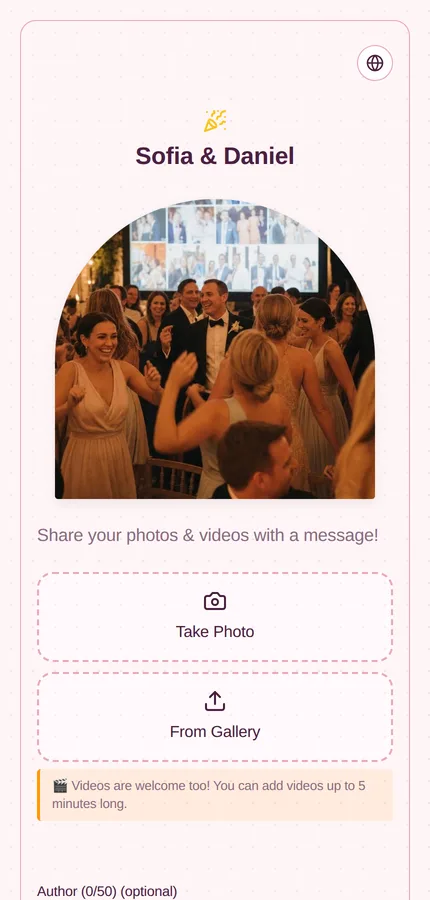
The Fotify guest upload page on a phone, showing the upload button and the event's recent photos

Photos on the big screen, seconds after they are taken

Cast the live display to any screen at the venue and every approved upload appears on it. Run it as a full-screen slideshow, or as a collage wall that keeps a board of recent photos on screen and drops each new arrival into it.

  • Slideshow and collage wall modes, with mosaic, polaroid and pile layouts
  • Control the screen from your phone with the carousel remote
  • Show the upload QR code on screen so new guests can join
  • Optional song-request QR alongside the photos
The Fotify live carousel filling a screen with a guest photo and the uploader's name

Nothing reaches the screen you did not want there

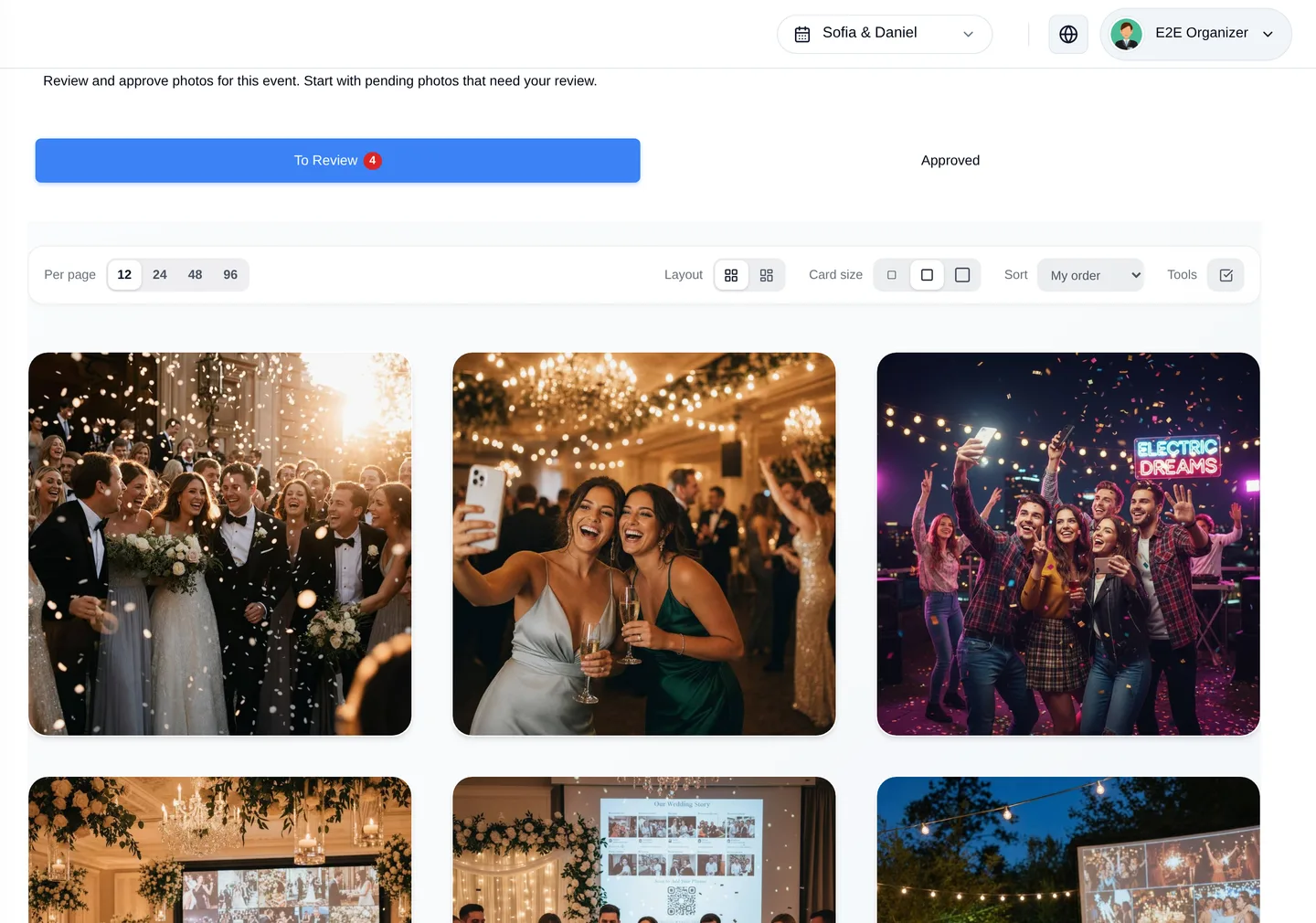
Choose how uploads are handled: publish everything instantly, review each one yourself, or let AI screen them first and only surface what needs a human decision. The review queue is one screen with approve and reject on every photo.

  • Auto-approve, manual approval, or AI screening
  • A review queue you can work through in seconds
  • Add extra moderators so you are not the bottleneck
  • Comment moderation on the shared album
The Fotify moderation queue with pending guest photos awaiting approval

A shared album your guests will actually open

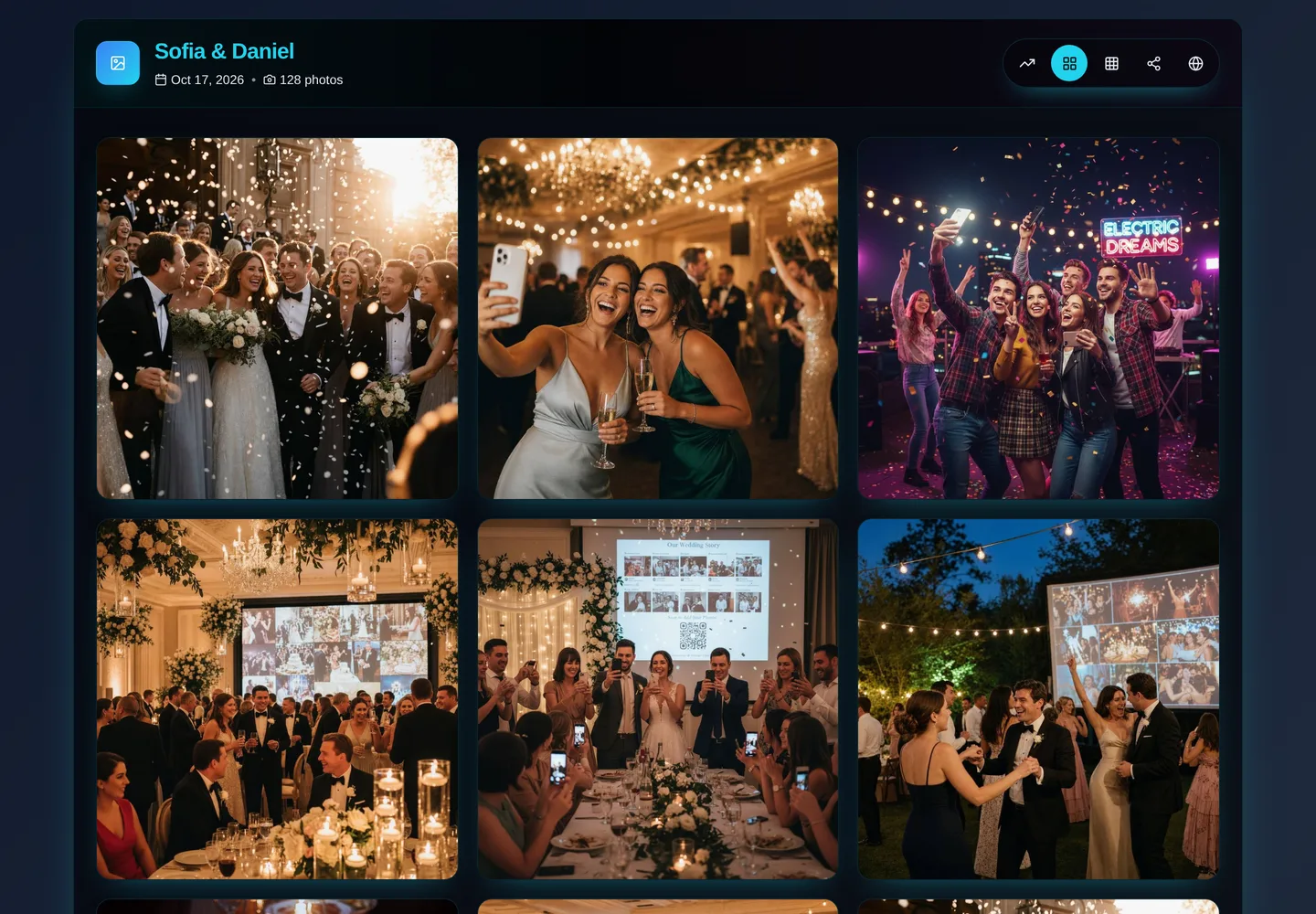
Every approved photo lands in a gallery you can share with a link. Guests browse it, react, comment and download in full resolution - and you can split the event into albums so the ceremony, the reception and the after-party do not end up in one endless scroll.

  • Grid, stories and social-feed views of the same album
  • Reactions, comments and per-photo downloads
  • Separate albums per moment, public or private
  • Download the whole event as a zip, or get a link by email
The Fotify public album showing guest photos from a wedding in a grid

One place to run the whole photo operation

The photos hub is the control room: how many uploads you have, how many are waiting for review, who can see what, and every share link the event needs. Bulk-upload your own camera roll to seed the album before guests arrive.

  • Live photo and video counts, approved and pending
  • Bulk upload from your own camera roll
  • Every share link in one place: album, QR, stories, social feed
  • Ask guests for details on upload with a custom form
The Fotify photos dashboard showing photo and video statistics next to sharing actions

Voice messages, not just pictures

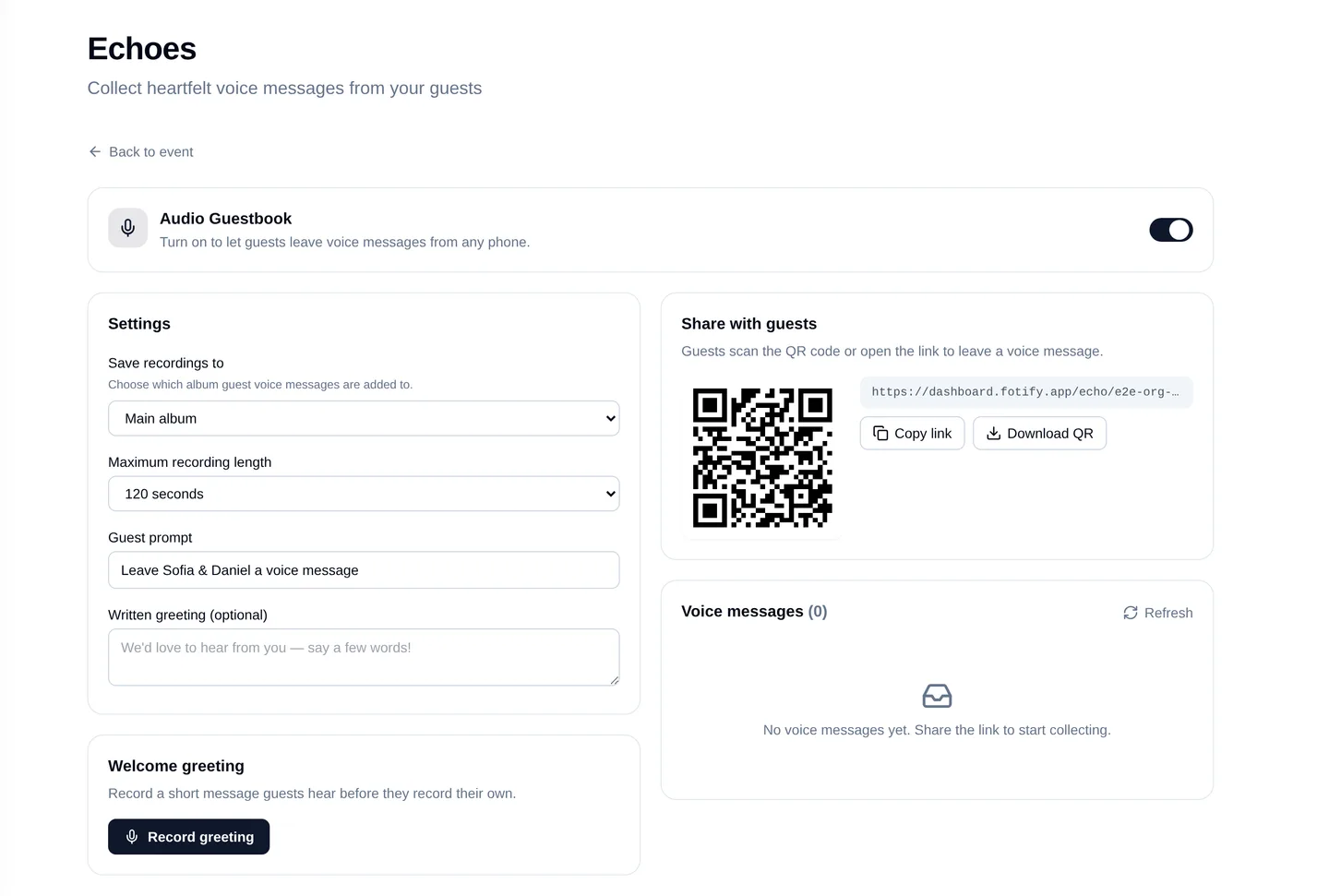
Echoes turns any phone into an audio guestbook. Guests record a message for you the same way they upload a photo, and you get the recordings to keep - the toast someone was too shy to give in front of the room included.

  • Guests record straight from the browser
  • Set your own prompt and a greeting they hear first
  • Messages land in the album next to the photos
  • Download every recording after the event
The Fotify Echoes audio guestbook settings with a recording prompt for guests

Invitations & RSVP

From save-the-date to a finished guest list

The invitation, the RSVP form, the guest list, the plus-ones, the dietary notes and the gift list are the same object in Fotify - answer once and every other screen already knows.

A digital invitation you design yourself

Pick a template, drop in your photo, set the palette, write the message and add the sections your event needs - schedule, location and map, dress code, accommodation, story timeline, custom blocks of your own. Preview it as a guest sees it before anyone gets the link.

  • Live preview on phone and desktop while you edit
  • Hero photo, palette, fonts and section order under your control
  • Countdown, map, itinerary, dress code, gifts and custom sections
  • Envelope opening animation for the moment a guest taps the link
The Fotify invitation editor with the live guest preview beside the design controls

Templates that look designed, not generated

A gallery of invitation designs from clean and editorial to cinematic and hand-lettered, each with its own typography, paper and palette options. Every one adapts to the sections you enabled and reads properly on a phone, which is where your guests will open it.

  • Free and premium template families
  • Per-template palettes, papers and ornaments
  • Or bring your own colours and override the theme
  • Renders correctly in 19 languages, right-to-left included
A premium Fotify invitation rendered on a phone, showing the cover, date and RSVP

RSVPs that answer themselves into your guest list

Guests confirm, decline, name the people they are bringing and answer whatever you asked them. You watch it land in real time: confirmed, declined, still waiting, total heads. Set a deadline and the form closes on its own.

  • Live counts of confirmed, declined and unanswered
  • Plus-ones with per-person names captured at RSVP time
  • Custom questions - meals, allergies, transport, anything
  • RSVP deadline enforced in your venue's timezone
The Fotify RSVP dashboard showing confirmed, declined and pending invitation counts

A guest list built for real events

Import the list from a spreadsheet, tag guests by side or table or group, filter by anything and export what your venue asks for. Registration links let people add themselves when you do not have the list up front.

  • CSV and Excel import with flexible headers, or paste from a sheet
  • Tags and filters for sides, groups and meal choices
  • Public registration links for open-invite events
  • Export the list, and the seating plan, for the venue
The Fotify guest list with parties, tags and RSVP status

Sub-events and VIP treatments

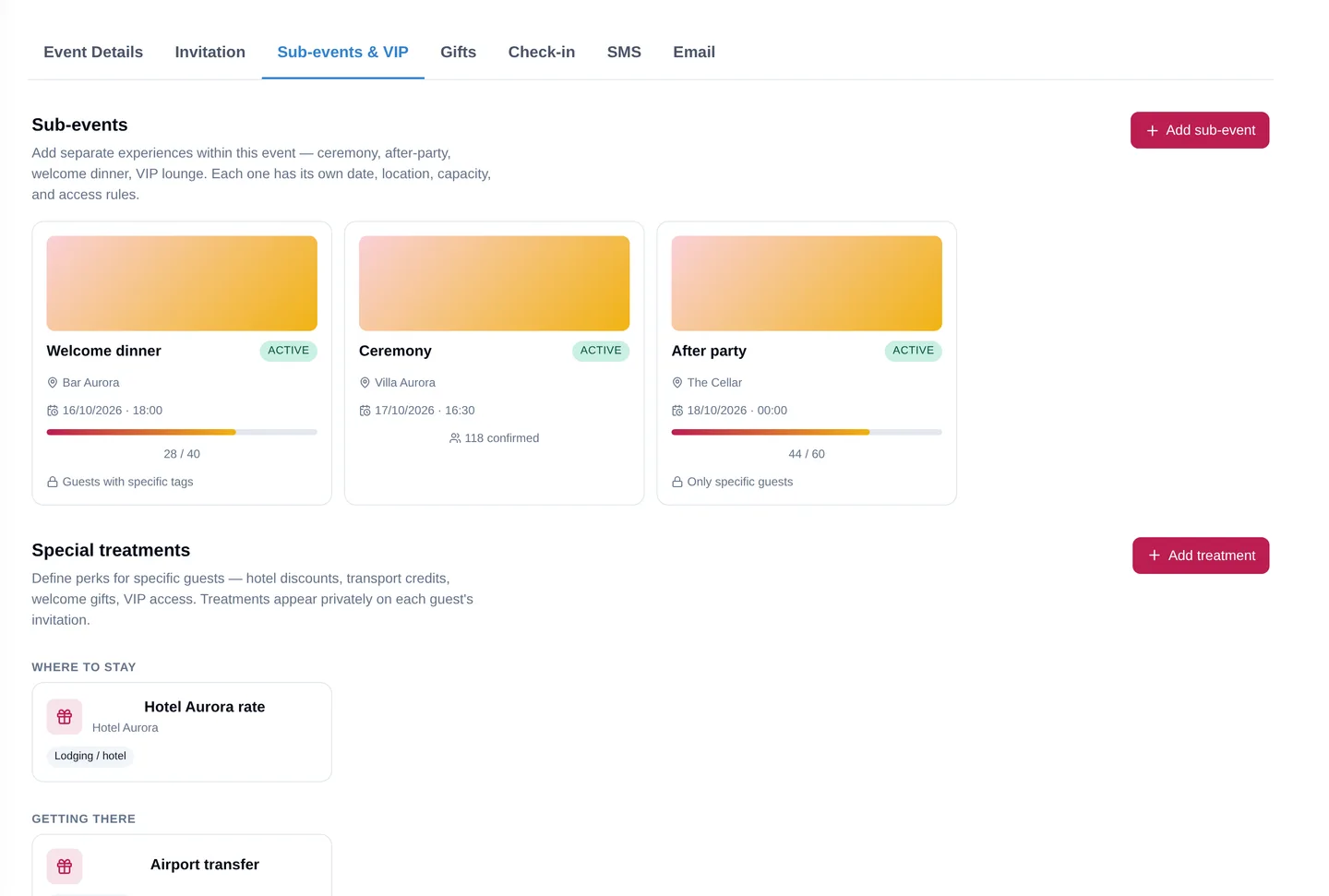
A wedding weekend is not one event. Add a welcome dinner, a ceremony, an after-party - each with its own RSVP, capacity and access rules - and hand chosen guests private perks: a hotel rate, a transfer voucher, VIP entry, redeemed with a code at the door.

  • Per-sub-event RSVP, capacity and access rules
  • Invite-only sub-events only the right guests can see
  • Special treatments with single-use or reusable redemption codes
  • Guests see only what applies to them, inside the same invitation
The Fotify sub-events and VIP treatments tab with per-event RSVP settings

Gifts, wishlists and thank-you notes

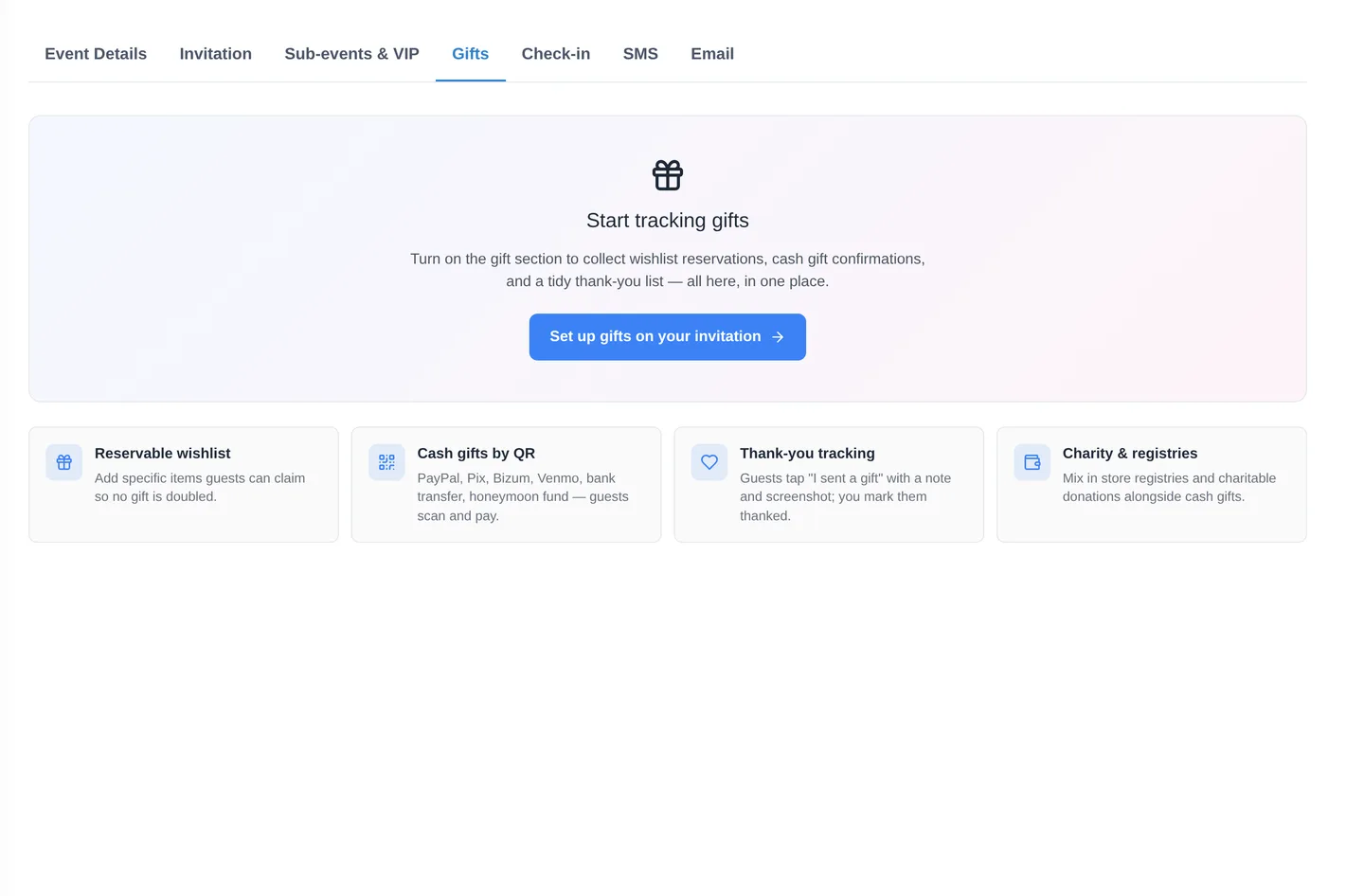
Add a wishlist guests can reserve from, so nobody buys the same thing twice, and let people who prefer to send money do it by scanning a QR. Guests mark what they sent, you mark who has been thanked, and the whole list stays in one place instead of on the back of an envelope.

  • Reservable wishlist so no gift is doubled
  • Cash gifts by QR: PayPal, Pix, Bizum, Venmo, bank transfer, honeymoon fund
  • Store registries and charitable donations alongside cash gifts
  • Thank-you tracking, so you know who is still waiting on a note
The Fotify gifts tab with a reservable wishlist, cash gifts by QR and thank-you tracking

Send it by link, WhatsApp, email or SMS

Sharing the invitation by link, QR code or WhatsApp is free and unlimited. When it needs to land in an inbox or a text message, send it from the dashboard: save-the-dates, invitations, reminders, event updates and thank-you notes, each with its own editable template, scheduled for whenever you want it to go.

  • Free unlimited sharing by link, QR code and WhatsApp
  • Email and SMS delivery, with quiet hours respected per country
  • Templates for save-the-date, invitation, reminder, update and thank-you
  • Schedule sends in advance, and see delivered, opened and clicked
The Fotify email tab showing credits, delivery stats and the editable email templates

On the night

The evening itself, not just the run-up

Seating, the door, the music and the icebreakers are where an event is actually won or lost. All four run off the same guest list you already built.

Seating charts you can drag into place

Build the tables, drop guests onto them from the RSVP list, and let auto-seating do the first pass. Guests can look up their own table from their invitation or a seat-finder link, so nobody circles the room holding a place card.

  • Drag-and-drop tables plus a one-click auto-seat pass
  • Floor plan view with the venue's own elements
  • Guest seat finder - guests search their own name
  • Several arrangements per event: dinner, boat trip, rehearsal
The Fotify seating planner with tables, unassigned guests and auto-seat controls

A door that knows who is on the list

Every confirmed guest gets a personal QR code in their invitation. Your staff open the door page on a phone, scan, and see instantly whether that person is on the list and how many people came with them - counted per person, not per invitation.

  • Personal QR code per guest, inside their invitation
  • Door page built for a dark venue and a long night
  • Per-person attendance within a party, not just per invite
  • Live arrival counts while the event is running
The Fotify check-in tab with attendance settings and door staff access

Song requests straight from the dance floor

Guests scan a code and request a track. The DJ works a live queue on a tablet - what has been asked for, what is popular, what has already been played - and you can put the request QR on the photo carousel so the ask is always one scan away.

  • Live request queue for the DJ, updated as requests arrive
  • Read-only display view for a screen at the booth
  • Guests see what has been requested and played
  • Request QR can ride along on the live photo carousel
The Fotify DJ dashboard with the guest request form link and the live request display

Games your guests play from their own phones

Photo battles, challenges, caption contests and guess-who rounds, run from the same link the album lives on. Start one when the room needs a lift, publish the results on the screen, and let the entries pile into your album while you are at it.

  • Photo battles, challenges, caption contests and guess-who
  • Guests vote from their phones, results published when you say
  • Entries land in the event album like any other upload
  • Runs alongside the social feed on one guest link
The Fotify gaming center listing photo battles, caption contests and quizzes

Match & Connect for the people who came alone

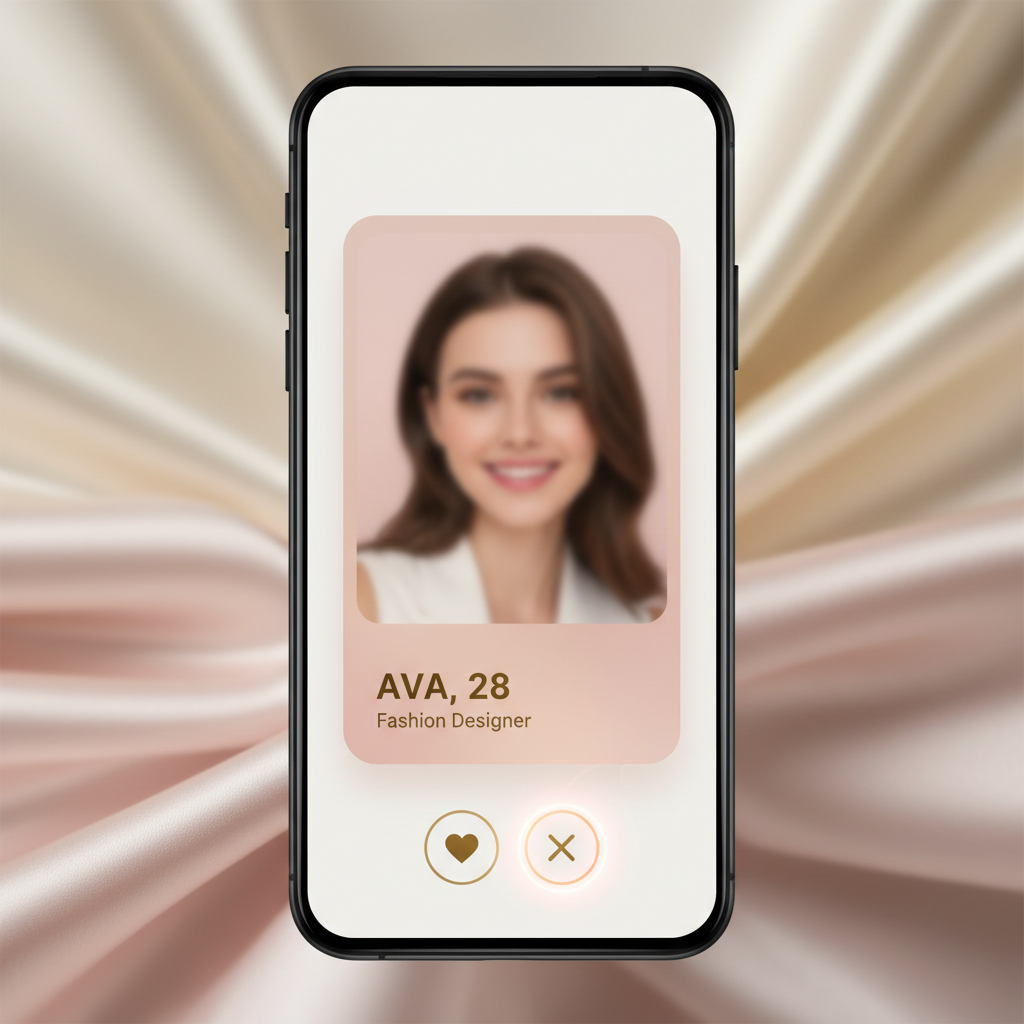
Social mode introduces single guests to each other the way an app would, but only inside your event. Business mode does the same for a conference floor: attendees say who they want to meet and Fotify puts them in front of each other. Contact details are revealed only on a mutual match, and everything is deleted when the event ends.

  • Social mode for weddings and parties, Business mode for conferences
  • Contacts and links revealed only when both sides match
  • Guests choose what they show and who can see them
  • All matchmaking data is deleted when the event ends
The Fotify Match & Connect interface showing guest profiles and a mutual match

Branding & control

It should look like your event, not like our software

Every guest-facing page can carry your name, your colours and your domain - which matters at a wedding and matters more when you run events for a living.

Your logo, your colours, your domain

Upload a logo and it appears across the guest pages. Set brand colours, a tagline, social handles and the share text guests see when they post a photo. Connect your own domain and the album, the upload page and the invitation all serve from it.

  • Logo, colours, tagline and website across guest pages
  • Custom domain - photos.yourdomain.com and the like
  • Watermark on downloads, and a custom photo frame on the carousel
  • Remove Fotify branding for a fully white-label event
The Fotify branding center with logo upload, custom domain and brand information fields

Design the page guests actually land on

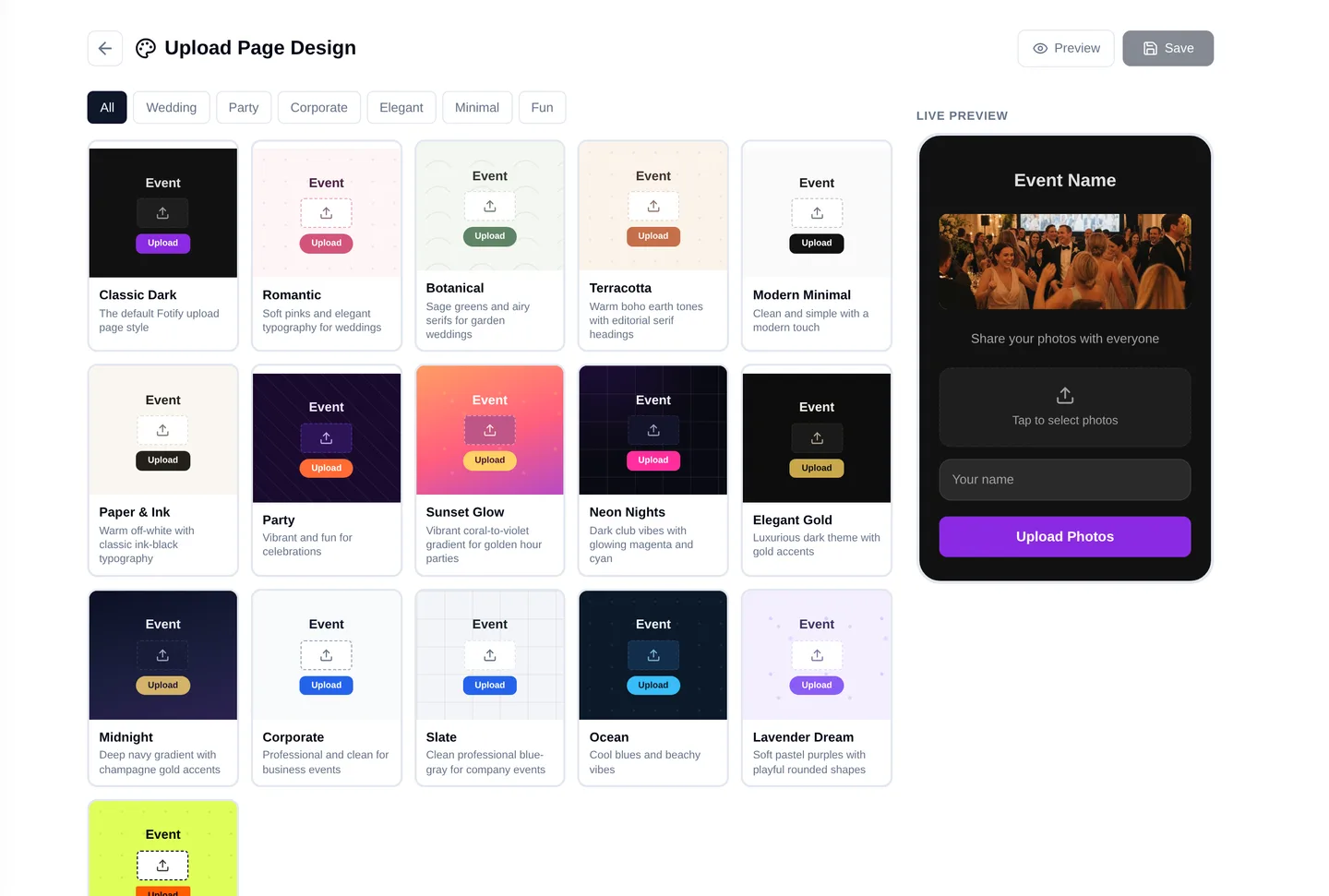
The upload page is the first thing a guest sees after scanning your code, so it gets its own designer: template, colours, photo shapes, hero image and the copy that tells people what to do. Add a form if you want to ask them something while they are there.

  • Templates, palettes, fonts and photo shapes
  • Your own hero image and welcome copy
  • Optional upload form with custom questions
  • Live preview of exactly what the guest will see
The Fotify upload page designer with template and colour controls beside a live preview

Everything reachable in one or two clicks

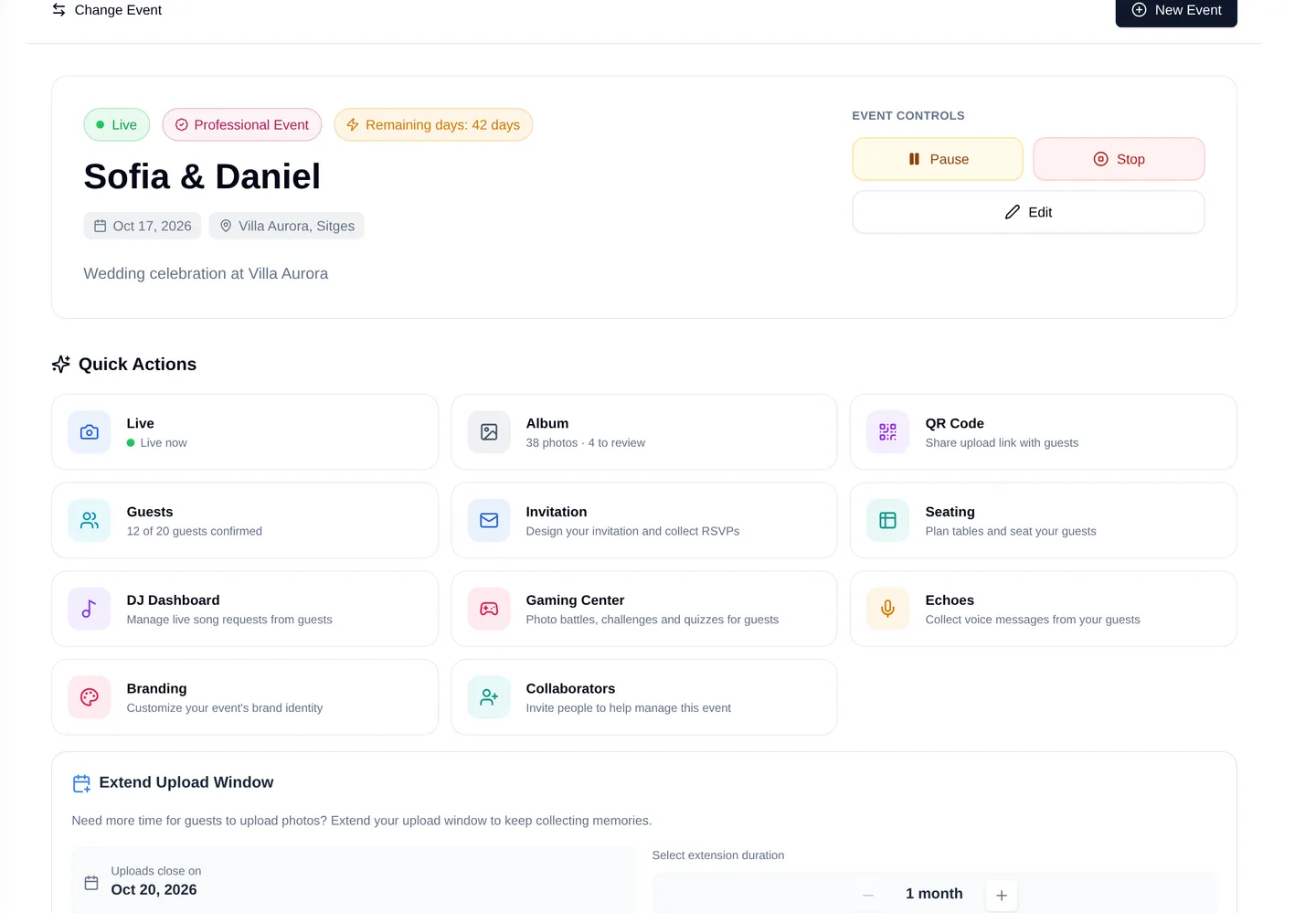
The event dashboard is the map: live display, album, QR code, guests, invitation, seating, DJ, games, voice messages and branding, each one action away, with the numbers that tell you whether the night is working.

  • Quick actions for every guest-facing surface
  • Live photo, guest and RSVP counts
  • Invite collaborators to run the event with you
  • Start, pause and schedule the event when you are ready
The Fotify event dashboard with quick actions for live display, album, guests, seating and more

Everything else

The parts you only notice when they are missing

Smaller than a headline feature, and the reason organizers stop juggling four tools.

19 languages

Guest pages and the organizer dashboard are fully translated, right-to-left languages included, and guests get their own language automatically.

Collaborators

Invite a partner, a planner or a family member to help run the event - guests, photos, invitations and settings, without sharing your password.

Custom domain

Serve the album, the upload page or the invitation from a domain you own, so the whole guest journey stays on your name.

Event insights

Uploads over time, RSVP progress, who has opened the invitation, which links guests actually used - the numbers you need while there is still time to act on them.

Bulk download

Take everything with you: the full-resolution album as a zip, or a download link sent to your inbox when the archive is ready.

Private by default

You decide what is public, what needs a password and what stays between you and your guests. Albums, sub-events and treatments each have their own access rules.

Connect your AI assistant

Link Fotify to Claude, ChatGPT or Gemini and run the event by asking - add guests, check RSVPs, design the invitation, schedule a send.

Short links & QR codes

Printable QR codes and short links for the upload page, the album and the song requests - and you can repoint a printed code at a different event later.

Multi-day itineraries

A schedule for events that run over a weekend, shown to guests inside the invitation with the times in your venue's timezone.

PDF & spreadsheet exports

Hand your venue what it asks for: the guest list, the seating plan and the itinerary, exported in a format they can actually use.

Built for people who run events often

Subscriptions for planners, agencies and venues: several active events at once, a shared email credit pool and team settings.

Support that answers

A help center, an in-dashboard assistant that can take you straight to the right screen, and real people behind it when that is not enough.

Not every feature is on every plan

Fotify starts free and scales up: the free plan collects photos, and the paid plans add invitations and RSVP, AI moderation, seating, games, matchmaking, custom domains and team features. The pricing page lists exactly what each plan includes.

Compare plans

Ready to Transform Your Next Event?

Join thousands of event organizers who trust Fotify to capture and share their most precious moments. Start your free trial today.