Add Fotify as a connector
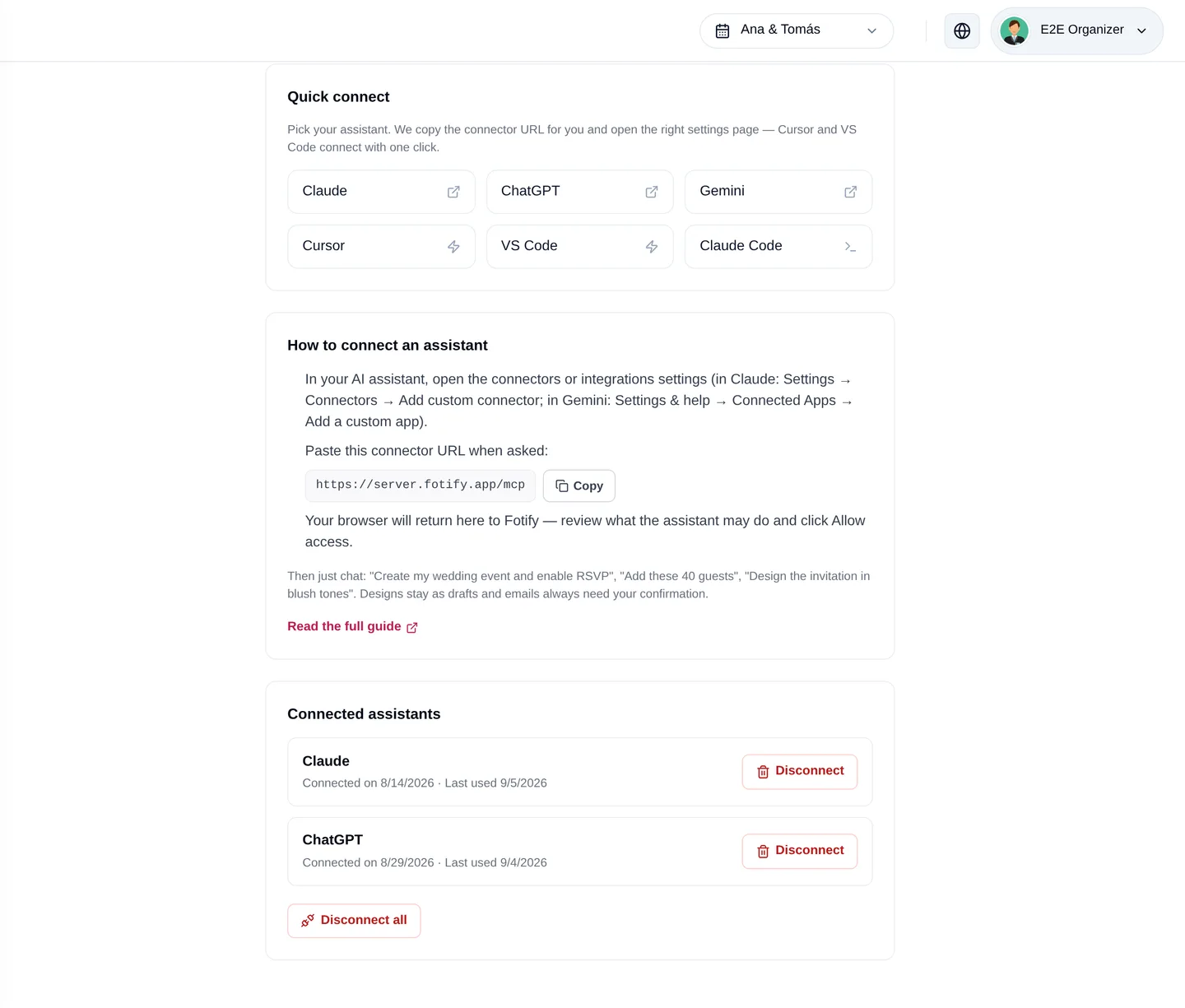
In Claude, ChatGPT, Gemini or Muse, add a custom connector with the URL server.fotify.app/mcp. Your assistant discovers Fotify automatically.
New: AI Assistant Connector
Connect Claude, ChatGPT, Gemini or Meta's Muse to your Fotify account and plan your event by chatting: guest lists, seating charts, invitation design, emails and photos — with your approval at every important step.
Free to connect • Uses your normal Fotify plan

Inside Fotify
No downloads, no API keys — just your assistant and your Fotify account
In Claude, ChatGPT, Gemini or Muse, add a custom connector with the URL server.fotify.app/mcp. Your assistant discovers Fotify automatically.
A Fotify consent screen shows exactly what the assistant may do — events, guests, designs. Approve it and you're connected. Disconnect any time from your account menu.

“Import my guest list.” “Seat everyone, families together.” “Design the invitation in ivory and sage.” Your assistant does the clicking; you stay in control.

What you get
Everything you manage in the dashboard, your assistant can now do with you in chat
Create events, set dates and locations, enable RSVP, build multi-day itineraries and custom RSVP questions — all from a chat message.
Paste a spreadsheet to import up to 100 guests at once, update RSVPs, segment with tags, and export everything back as CSV.
Paste your venue's floor plan into the chat and the assistant rebuilds it in your seating chart — tables, stage, dance floor and all — then seats your guests.
Describe the look you want and the assistant designs your invitation with the AI Design Studio engine: drafts first, live only when you apply.
Customize every email template, send tests to your own inbox, and schedule sends — nothing reaches guests without your explicit confirmation.
Confirmation gates on emails and deletions, drafts for designs, revocable OAuth access and your plan's limits — enforced by Fotify, not by the AI's good manners.
Chatbots can write checklists. A connected assistant operates your real event platform.
| Feature | Fotify | Advice-only AI chatbot |
|---|---|---|
| Creates and updates your real event | Yes | No |
| Imports and manages your actual guest list | Yes | No |
| Builds tables and seats guests for you | Yes | No |
| Rebuilds your venue map from a photo | Yes | No |
| Designs the invitation guests receive | Yes | No |
| Prepares and schedules real email sends | Yes | No |
| Reports live RSVPs, photos and email stats | Yes | No |
| Server-enforced confirmation on risky actions | Yes | No |
| One-click revocable access, no shared login | Yes | No |
AI assistants are great at planning conversations but historically couldn't touch the tools where events actually live. Fotify's connector, built on the open Model Context Protocol (MCP), closes that gap: Claude, ChatGPT, Gemini or Meta's Muse gets safe, permission-scoped access to your event so the conversation becomes the setup.
You add Fotify as a connector in your assistant, approve access once on a Fotify consent screen, and the assistant receives a secure, revocable token — never your password. Every action runs through the same ownership checks as the dashboard, and the sensitive ones (sending emails, deleting things, publishing designs) require your explicit confirmation, enforced server-side.
Read the setup guideWeddings are where the connector shines: import the guest list from your spreadsheet, tag family and friends, gate the rehearsal dinner to the right guests, rebuild the venue's floor plan from the PDF your venue sent, seat everyone, and design an invitation that matches your palette — all in one conversation.
Explore Fotify for weddingsStart creating unforgettable events with our flexible pricing options
Try Fotify risk-free. If you're not completely satisfied with your event, we'll refund your purchase. No questions asked.
View our refund policy →Questions
Any assistant that supports remote MCP connectors, including Claude (claude.ai), ChatGPT, Google Gemini (as a custom connected app, on personal Google accounts) and Meta's Muse (ask it to connect an MCP server). The connector URL is the same for all of them: server.fotify.app/mcp.
No. Email sends require a preview of exactly who will receive them plus your explicit confirmation, and deletions of photos, sub-events or registration links are refused by our servers until you confirm. Design changes stay in drafts until you apply them.
The connection is free. Anything the assistant does uses your normal Fotify plan — the same email credits, AI image quota and premium entitlements as the dashboard. If you allow it, the assistant can also prepare a secure Stripe checkout link to buy a plan, upgrade an event or start a subscription; you always complete the payment yourself on Stripe, nothing is ever charged from the chat.
Paste a photo of your venue map into the chat. The assistant reads it (images never leave your conversation) and recreates the layout in your Fotify seating chart — tables, stage, dance floor and more — positioned proportionally, ready to fine-tune by dragging.
Your login is never shared. The assistant receives a revocable token through OAuth, the same authorization standard used by major platforms, limited to the permissions you approved. You can disconnect any assistant instantly from the AI assistants page in your account menu.
The dashboard stays your home base — the assistant works on the same data you see there in real time. Use whichever is faster in the moment: chat for bulk work and ideas, the dashboard for visual fine-tuning like dragging tables or reviewing design drafts.
Create your event, connect your assistant, and hand over the busywork.
Free to connect • You approve every important action