Event planning app

Plan the event together, from the first quote to the final payment

A shared planning hub for the people organizing an event: one budget with who pays what, email reminders before every deposit, vendors and contracts in one place, a decisions board for the big choices and a dated checklist. It sits next to your invitation, RSVPs and photo gallery, so the numbers stay live.

  • Per-guest costs follow your confirmed RSVPs
  • Reminders a week and a day before each payment is due
  • Everyone planning sees and edits the same plan

Included in the higher event plans and every event subscription. Preview it with sample data on any plan.

A couple leaning over printed vendor quotes and a laptop, planning their event budget together
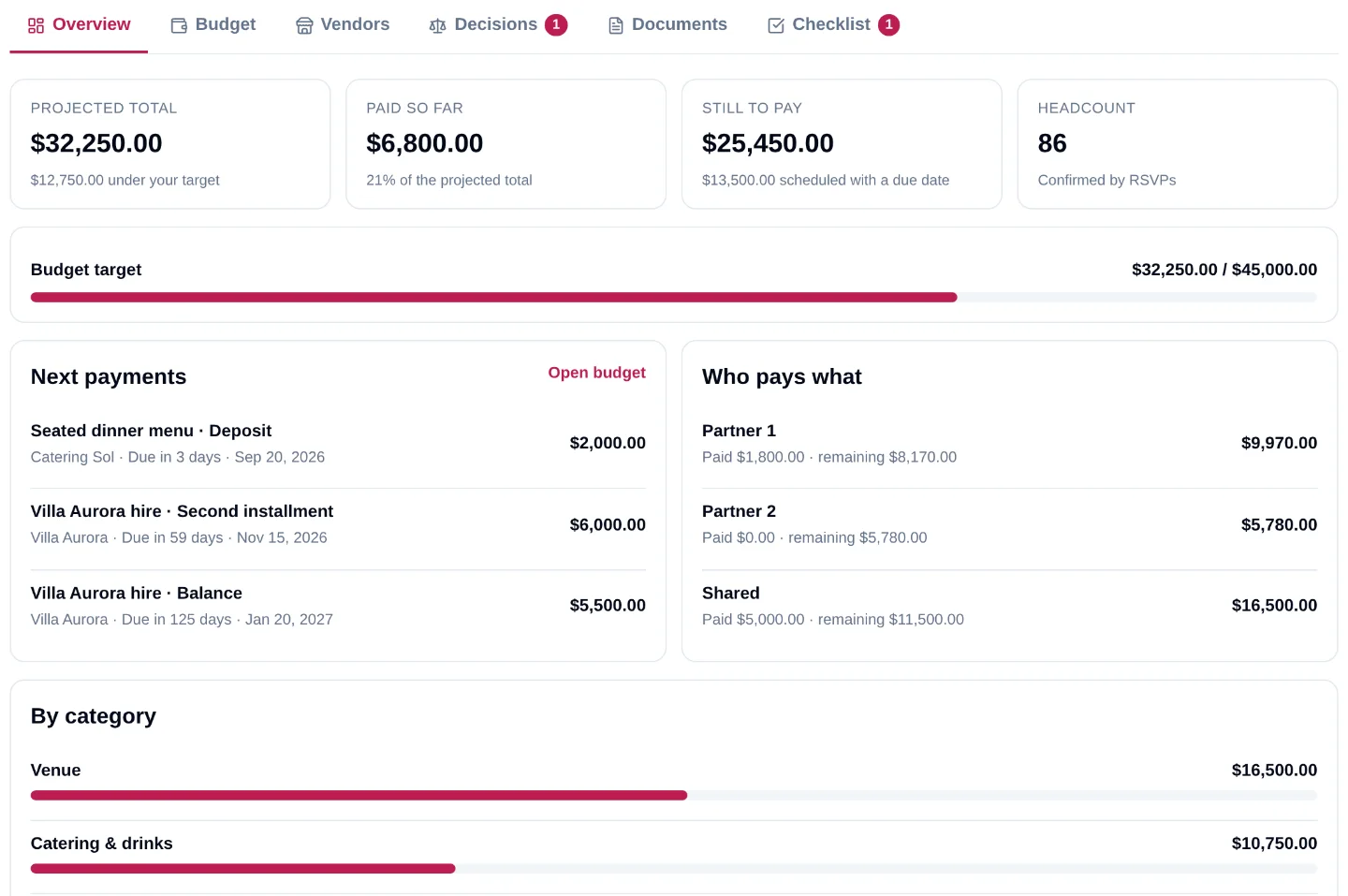
The planning hub overview with projected total, paid, still to pay, next payments and who pays what

What you get

Everything the organizers need, in one hub

Six tabs that share the same numbers, the same vendors and the same to-do list.

A shared budget that tells the truth

Categories seeded from a template, estimates that give way to contracted prices, and a payment schedule under every line: deposit, installments, balance. Mark a payment paid and every total moves at once.

  • Estimated vs contracted, projected, paid and remaining per line and per category
  • Deposits and balances with due dates, reminded a week and a day before
  • Budget CSV, payments CSV and a printable PDF summary
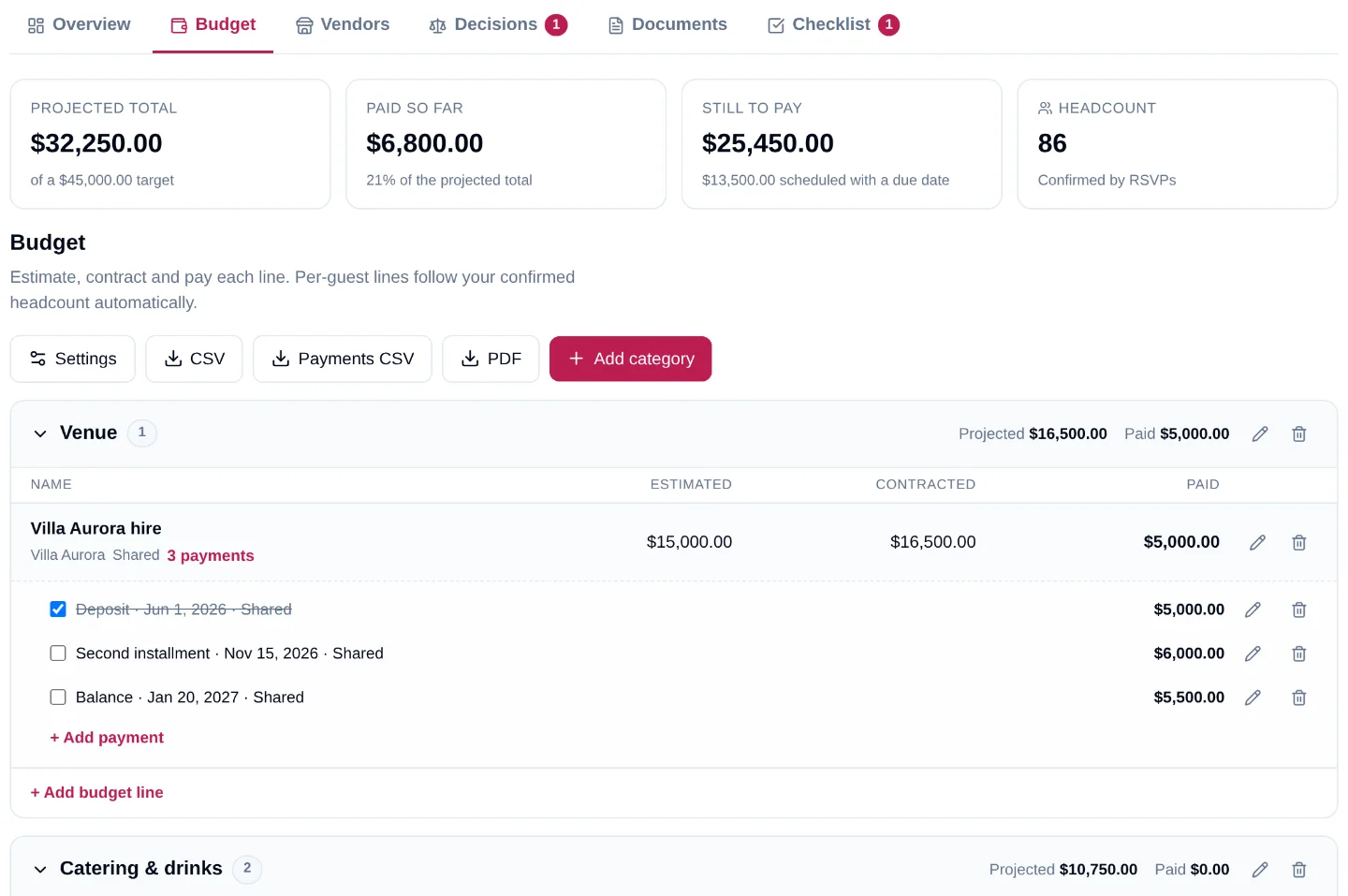
The budget tab with a venue line, its contracted price and three scheduled payments

Who pays what, and per-guest costs that follow your RSVPs

Assign a payer to every line and every payment: Partner 1, Partner 2, shared, the families, the company. Catering, bar and rentals are entered per head and multiplied by the guests who actually confirmed.

  • Up to eight payers, each with paid and remaining totals
  • Headcount from accepted RSVPs, or your expected guests until they arrive
  • A budget target with progress you can read at a glance
The planning hub overview with projected total, paid, still to pay, next payments and who pays what

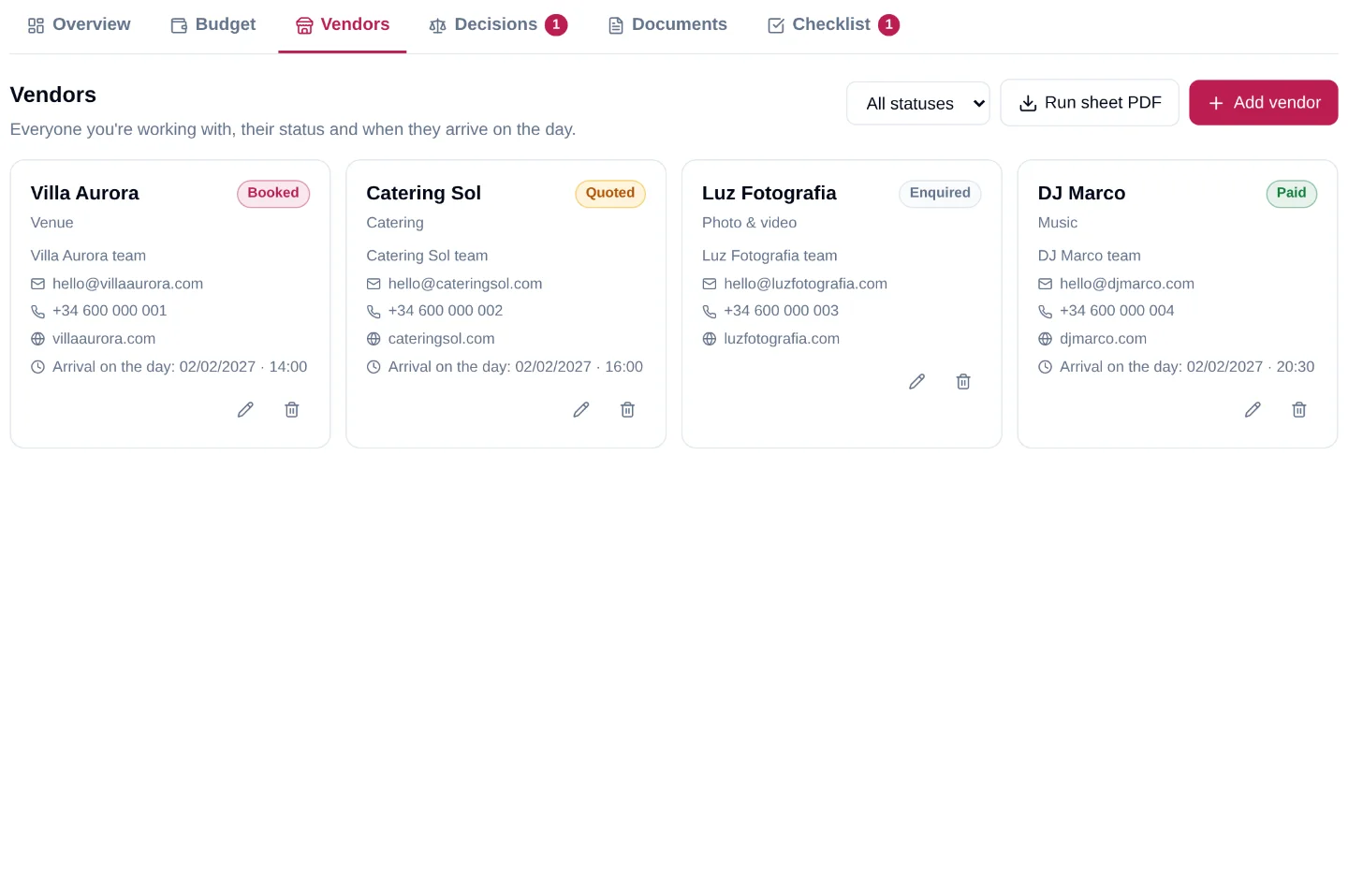
Every vendor, their status and their arrival time

Venue, caterer, photographer, band: each with a contact person, phone, email and website, a status from enquired to paid, and the time they are expected on site. Linked to the budget lines and documents they belong to.

  • Enquired, quoted, booked or paid, filterable in one click
  • Linked to budget lines, decision options and documents
  • Run sheet PDF with your itinerary and every vendor's arrival time
The vendor directory with status badges, contacts and arrival times on the day

Decide together on a decisions board

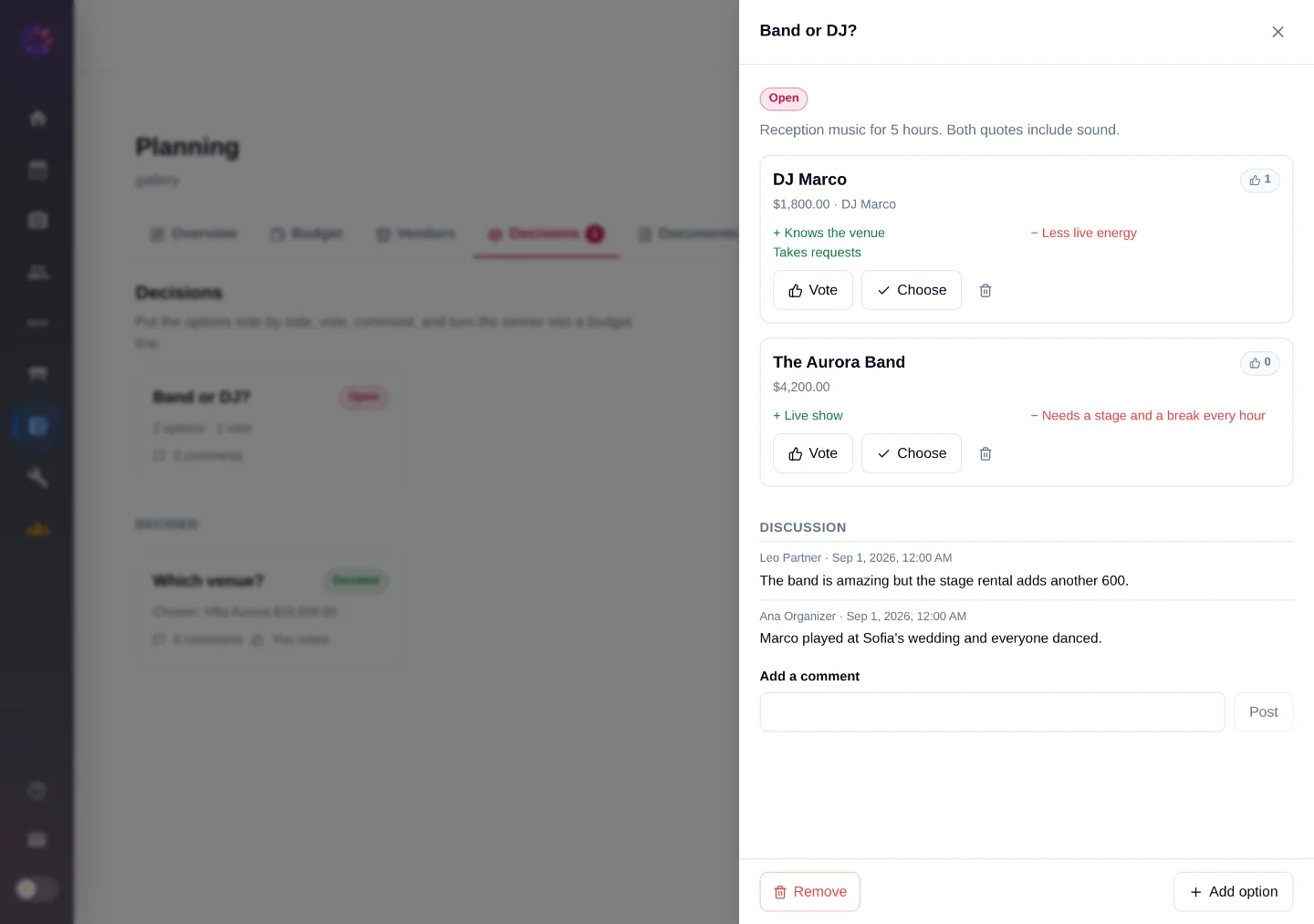
Which venue, band or DJ, buffet or plated. Put the options side by side with a price, pros and cons, vote, discuss in the thread, and choose. The winner becomes a contracted budget line and its vendor is booked in the same click.

  • Up to ten options with price, pros, cons, link and vendor
  • One vote per person and a discussion under every decision
  • Choosing creates the budget line and books the vendor
A 'Band or DJ?' decision with two priced options, votes and a discussion thread

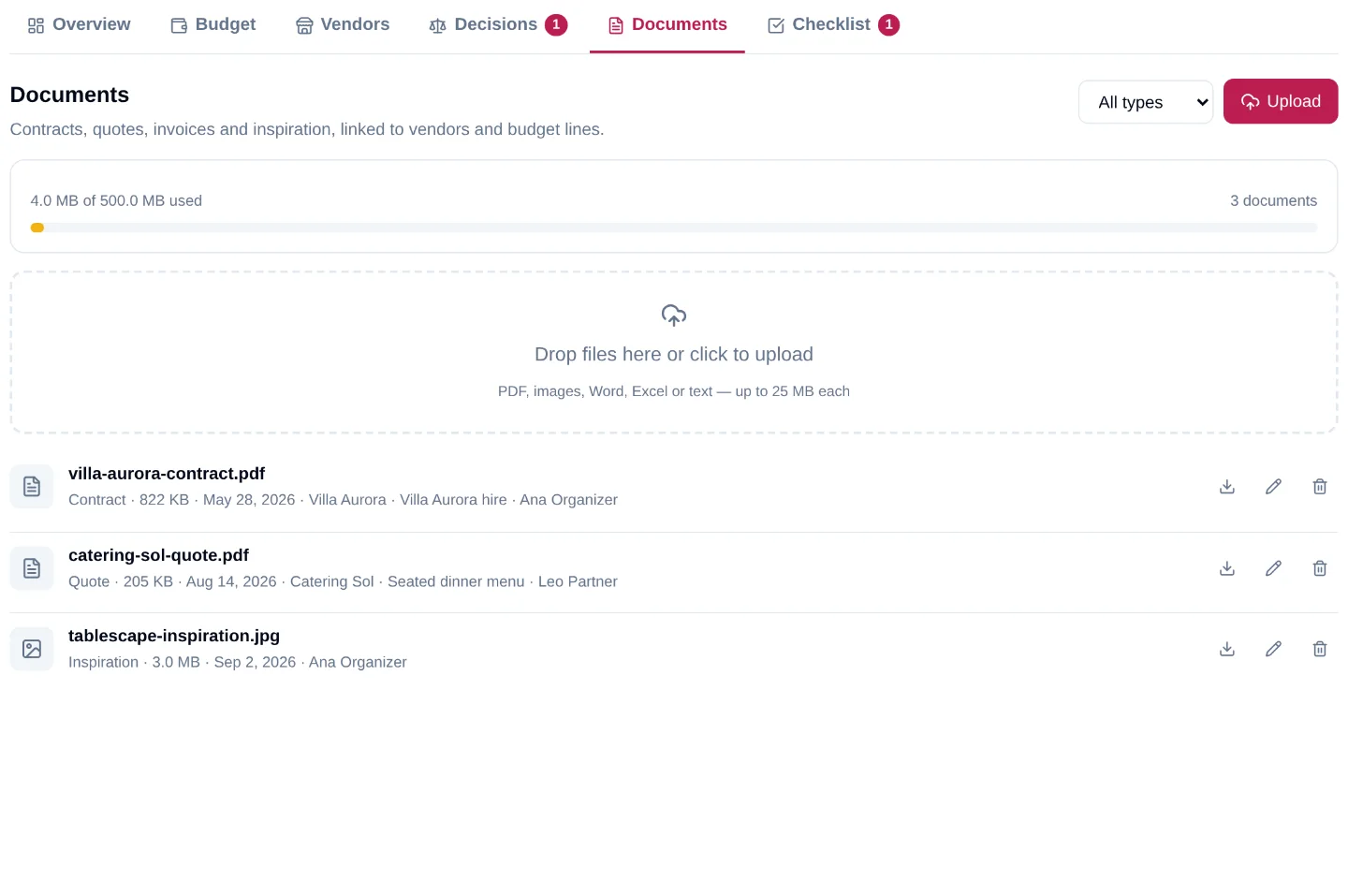
Contracts, quotes and inspiration next to the budget line

Drop the signed contract, the quote and the invoice on the Documents tab and link each to its vendor and budget line. When a vendor says "as agreed", the agreement is two clicks away.

  • PDF, images, Word, Excel and text, up to 25 MB each
  • Typed as contract, quote, invoice or inspiration, filterable
  • Private to the organizers, with short-lived download links
The documents tab with a contract, a quote and an inspiration image linked to vendors and budget lines

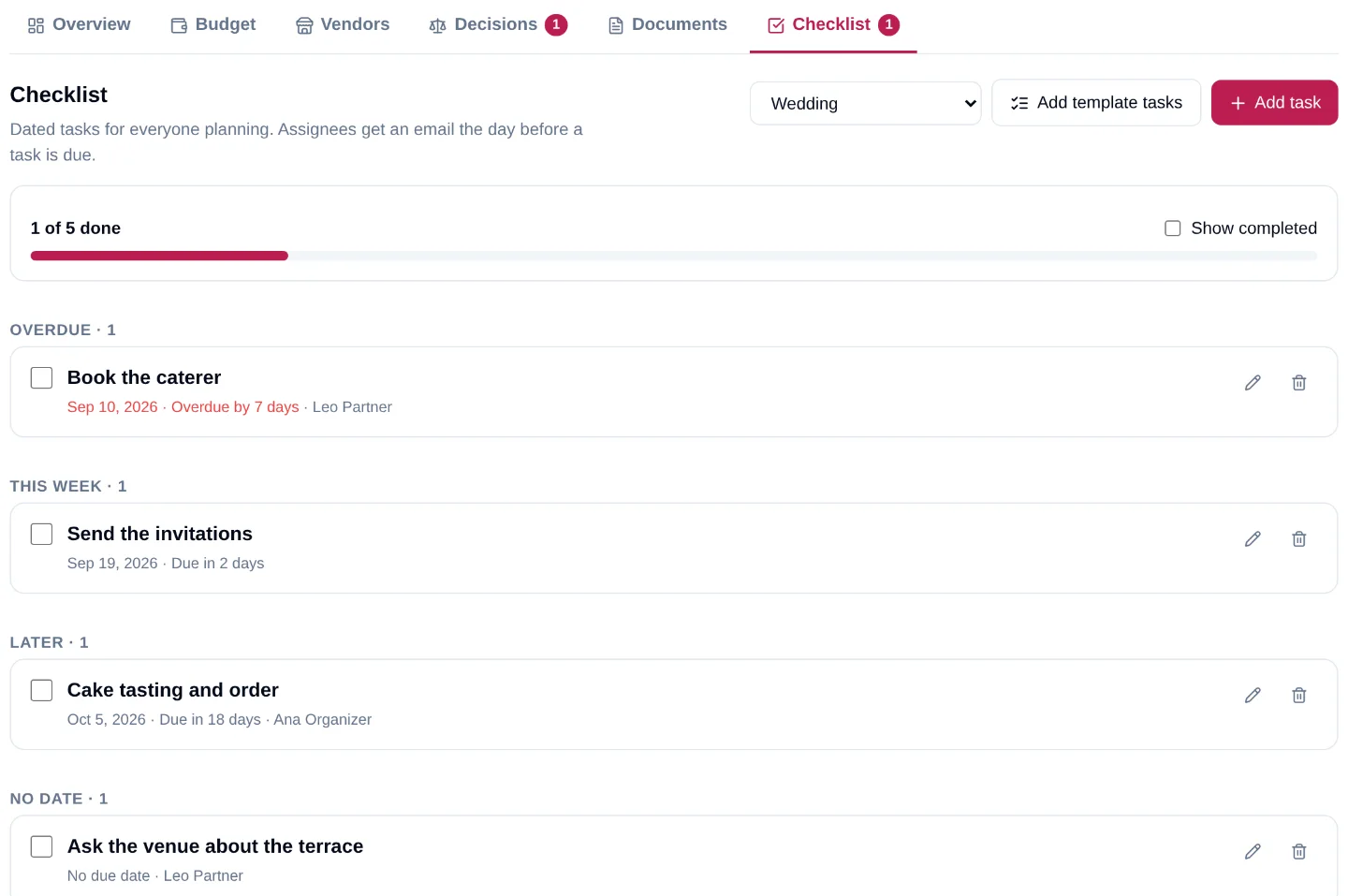
A checklist dated from your event day

Templates for weddings, parties and corporate events seed the tasks and date them backwards from the day: book the venue eleven months out, confirm arrival times three days before. Assign each to someone and tick them off together.

  • Overdue, this week and later, with progress everyone can see
  • Assignees get an email the day before a task is due
  • Add your own tasks next to the template ones
The dated checklist grouped into overdue, this week, later and no date

Built for

Built for the people who plan together

Anywhere more than one person holds the budget, the hub keeps them on the same page.

Couples and their families

Split the wedding budget between partners and parents, and keep every deposit date in one place instead of two inboxes.

Hosts and co-hosts

Birthdays, anniversaries and celebrations planned by friends: shared costs, shared vendors, one checklist.

Teams and committees

Conferences and company events with AV, speakers, catering and travel lines, contracts attached and a run sheet for the day.

Planners running several events

A hub per event, with the client as a collaborator on the budget and decisions, and the vendors and documents where you left them.

Inside Fotify

How it works

Set up in a minute, then plan at your own pace.

  1. Pick a template

    Open Planning in your event and choose Wedding, Party, Corporate or Other. It seeds the budget categories, the payers and a dated checklist. Set the currency, your expected guests and a target.

  2. Enter estimates, then quotes

    Add a line per cost with a guess, a payer and a vendor. When a quote is signed, enter the contracted price and the payment schedule; per-guest lines follow your headcount.

  3. Invite your co-organizers

    Add your partner, family or team as event collaborators. They see and edit the same hub, vote on decisions and receive the reminders.

  4. Let the reminders work

    A week and a day before each payment, and the day before each task, everyone planning gets an email with a link back to the hub. Tick things off as they happen.

Inside Fotify

Connected to the rest of your event

The planning hub is not a separate app. It reads from the same event as your invitation, guest list and gallery.

Event collaborators

Invite the people planning with you. Accepted collaborators get the same access to the hub as the organizer.

How collaborators work

Invitations and RSVP feed the headcount

Every accepted RSVP updates the per-guest lines, so the catering line and the projected total are never a week behind.

Digital invitations with RSVP

Works with your AI assistant

Connect Claude, ChatGPT or Gemini and ask it to add a deposit, list what is due this month or set up the hub for you.

Connect an AI assistant

Questions

Questions about the planning hub

Who can see and edit the planning hub?

The event's organizer and every accepted event collaborator. Guests never see it; nothing in the hub is linked to the invitation or the photo album.

Which plans include it?

The planning hub is included in the higher one-off event plans and on every event created under an event subscription. On other plans you can open it and browse every tab with sample data. See the pricing page for the current plans.

Can we split costs between partners and parents?

Yes. Every event has a list of payers (up to eight). Assign one to each budget line, and a different one to an individual payment if needed. The overview shows projected, paid and remaining totals per payer.

How do per-guest costs work?

Tick 'This is a per-guest cost' on a line and enter the per-head price. It is multiplied by the guests confirmed through your RSVPs, or by your expected guests until you have any, so the projected total moves as replies come in.

When are reminders sent, and to whom?

A week and a day before an unpaid payment's due date, and the day before a task's due date. They go by email to the organizer and every accepted collaborator, in their own language.

Can I change the currency later?

Yes, from the budget settings. Amounts are relabeled, not converted, so pick the currency before entering quotes if you can.

Can I export the budget to a spreadsheet?

Yes. The Budget tab exports a CSV of every line and a separate CSV of every payment, plus a PDF summary. The Vendors tab exports a run sheet PDF with your itinerary and every vendor's arrival time.

Have the who-pays-what conversation this week

Create your event, open Planning, pick a template and share it with the people planning alongside you.

Free to start. Preview the planning hub with sample data on any plan.