Introducing the AI Design Studio: Chat Your Invitation Into Its Best Design
Most people know exactly how they want their invitation to feel. "Romantic, but not cheesy." "Elegant, like a magazine editorial." "Fun, tropical, a little loud." What they don't have is an afternoon to translate that feeling into font pairings, color palettes, and section layouts.
That translation step is what we just automated. The AI Design Studio is a designer you chat with, built directly into Fotify's invitation editor. You describe the invitation you want, and it designs it in front of you: colors, fonts, layout, section order, even custom-generated cover artwork. Every change appears as a live preview, and nothing reaches your guests until you decide to apply it.
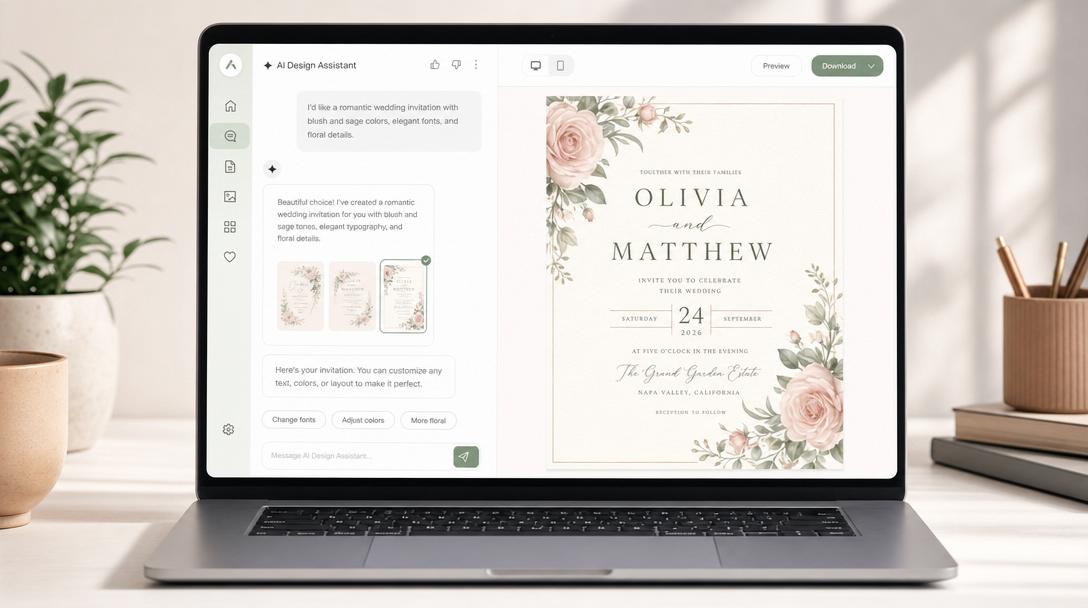
What It Does
Open your event's invitation editor and switch to the AI tab. From there, the conversation is the design tool:
- "Make it feel like a candlelit winter wedding" and the AI restyles your palette, typography, and backgrounds to match.
- "Move the countdown above the RSVP and make it more minimal" and it reorders your sections and switches the countdown to a quieter layout.
- "Generate a cover image of a garden at dusk with warm lanterns" and it creates original hero artwork for your invitation, drawn from your description or inspired by photos you upload.
- "Use the colors from @ourlogo" and it pulls from your own uploaded assets. Anything you add to the asset library (logos, photos, graphics) is analyzed automatically and can be referenced in chat by name.
The AI works across all of Fotify's invitation templates, from classic styles to the premium editorial designs, and can restyle every part of the page: the cover, the story section, the RSVP block, the itinerary, the countdown, down to details like ornaments, image masks, and motion.
Preview First, Apply When You Love It
Every design the AI produces is a draft, rendered as a live preview in both desktop and mobile views. Each iteration is saved as a numbered version, so you can step backward and forward through revisions, compare directions, and keep pushing ("warmer", "less busy", "try a serif") without losing anything.
When a version feels right, you apply it, and only then does your live invitation change. Your guests never see the experiments.
There's a quiet quality-control layer working for you too: after larger redesigns, the AI re-checks its own work against an art director's checklist (hierarchy, rhythm, consistency, readability, restraint) and fixes issues before showing you the result.
Why We Built It Into the Invitation, Not a Poster
Plenty of AI tools can generate a pretty invitation image. The problem is that an image is where the job starts, not where it ends: you still need to deliver it, collect RSVPs, answer "can I bring a plus one", and keep everyone updated when the schedule changes.
The AI Design Studio designs a living invitation page. Behind the design you shape in chat sits everything Fotify's digital invitations with RSVP tracking already do: one shareable link, real-time RSVP responses, guest preferences, itineraries for multi-day events, and photo sharing once the event starts. The AI changes how your invitation looks, and the platform keeps doing the work an invitation is actually for.
If you're still choosing a platform, our comparison of the best digital invitation apps shows how Fotify stacks up against Paperless Post, Evite, and the rest.
How to Try It
The AI Design Studio is rolling out now in early access:
- Open your event in the Fotify dashboard and go to the invitation editor's AI tab.
- If your account doesn't have access yet, tap Request early access and we'll enable it for you as the rollout expands.
- Every event includes free AI design messages to try it. Events on a premium plan unlock the full message allowance and more AI-generated artwork.
Describe the invitation you want. Watch it appear. Apply it when you love it.
Related Pages
Discover how Fotify can transform your events